Dashboard နှင့် Metrics
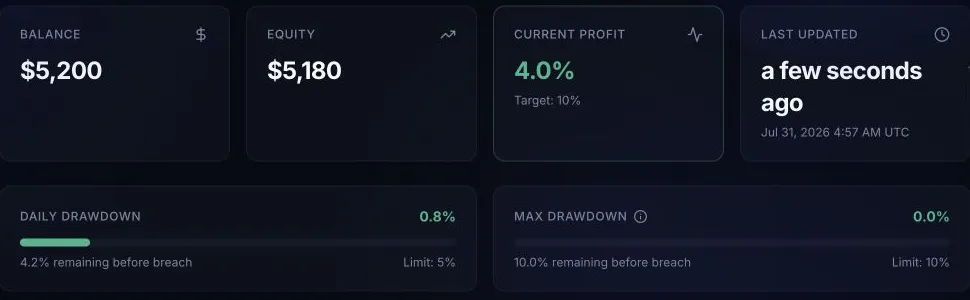
Balance၊ equity၊ profit၊ drawdown၊ trading days၊ phase၊ status နှင့် update time ကို ဖတ်ပါ။
Trade execution ချက်ချင်းကြည့်ရန် MT5 ကိုသုံးပြီး program progress အတွက် BFT dashboard ကိုသုံးပါ။ Metric တစ်ခုကို လက်ရှိဟု ယူဆမီ dashboard update time ကို အမြဲစစ်ပါ။
မစတင်မီ
Account တစ်ခုထက်ပိုပါက သက်ဆိုင်ရာ account ကို ရွေးပါ။ Chart သို့မဟုတ် gauge မဖတ်မီ program၊ phase၊ status နှင့် account number ကို စစ်ပါ။
လုပ်ဆောင်ပုံ
- Balance: Closed trading result နှင့် account adjustments။
- Equity: Balance နှင့် floating profit/loss ပေါင်းထားခြင်း။
- Profit: Current evaluation target ဆီသို့ progress။ Funded account တွင် evaluation target မရှိပါ။
- Profit Progress chart: နေ့စဉ် sync လုပ်ထားသော profit snapshot များနှင့် နောက်ဆုံး current profit ကို ပြသည်။ မြင်နေရသော Trade History row များကို ပေါင်းပြီး chart တွက်ထားခြင်း မဟုတ်ပါ။
- Daily Drawdown: လက်ရှိ dashboard day အတွက် သုံးပြီးသော loss၊ equity effect အပါအဝင်။
- Maximum Drawdown: Initial simulated balance နှင့် နှိုင်းထားသော overall loss။
- Trading Days: Current phase အတွက် qualifying days။ နေ့တစ်နေ့ချင်းစီကို UTC သန်းခေါင်ယံအစား trading provider ၏ daily rollover အချိန်ဖြင့် သတ်မှတ်သည်။
- Trade History: BFT သို့ sync လုပ်ထားသော closed trades။
- Phase and Status: Current stage နှင့် active၊ completed၊ funded သို့မဟုတ် စည်းမျဉ်းချိုးဖောက်မှု ဖြစ်ထားသော အခြေအနေ။
- Update time: BFT က account data နောက်ဆုံး sync လုပ်ချိန်။
Daily reset card တွင် countdown ပါသည်။ Time zone အလိုက် fixed clock time ပြောင်းတွက်မည့်အစား ၎င်းကိုသုံးပါ။
အောင်မြင်သည့်အခြေအနေ
ရွေးထားသော account သည် MT5 နှင့်ကိုက်ညီသည်၊ update time သည် မကြာသေးမီဖြစ်သည်၊ balance၊ equity နှင့် closed history သည် trading platform နှင့်ကိုက်ညီသည်။ Evaluation အတွင်း profit နှင့် trading-day cards က current phase progress ကိုပြသည်။
ဖြစ်လေ့ရှိသောအမှားများ
- Phase ပြောင်းပြီး အခြား account metrics ကိုဖတ်ခြင်း။
- Current MT5 equity ကို အဟောင်း dashboard timestamp နှင့် နှိုင်းခြင်း။
- Open position က equity လျော့နေချိန် balance ကို loss-limit input ဟု ထင်ခြင်း။
- Daily countdown ကို payout countdown ဟု ထင်ခြင်း။
နောက်ထပ်ဘာဖြစ်မလဲ
Dashboard တွင် loss-limit headroom လုံလောက်သည်ကို အတည်ပြုမှသာ ဆက် trade လုပ်ပါ။ Passing condition အားလုံးပြည့်လျှင် Passing နှင့် account progression ကိုဖတ်ပါ။